Tech review: Switchbot Lock Vision Pro can do it all
Published in Science & Technology News
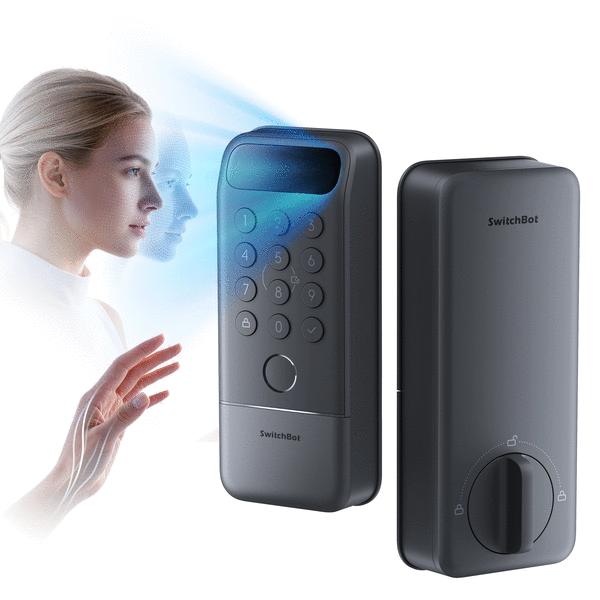
Smart door locks are some of the most convenient gadgets I’ve ever installed at my house.
It doesn’t take long to get used to getting into your house without a key. Entering a passcode on a keypad or using an app on your phone to open the door is pretty slick.
Newer smart locks have incorporated biometrics, so you can use a fingerprint or the veins in your palm or even your face to unlock the door.
I’ve been testing the newest offering from Switchbot called the Lock Vision Pro ($229.99, us.switch-bot.com), which uses all the above-mentioned methods plus others to let you quickly get in and out of your house without a key.
You can tell how comfortable you are with smart lock technology when you leave the key at home or you install a lock that doesn’t even have a key (I’ve done both).
Features
I’ve installed half a dozen smart locks, and the Lock Vision Pro has the most unlocking methods of any of the locks I’ve used — you can unlock it at least 10 ways.
Let’s see if I can name them all: face, palm vein, fingerprint, keypad, NFC, geofence, app, Apple Watch, voice, widget, key. That’s eleven ways.
I’ve used locks with apps, keys, NFC, keypad, fingerprint and palm vein. The Lock Vision Pro is the first lock I’ve tried with face recognition — and it gave me some problems — but I’m not ready to write it off just yet.
Because it’s not obvious, NFC means near field communication, which is a small card with a chip in it that unlocks the door when you tap the card on the lock.
The Lock Vision Pro integrates with almost every smart home technology including, Alexa, Apple Home, Google Home, Home Assistant, SmartThings and Homey. It uses the Matter protocol over Wi-Fi, so it does all these things without a hub. It also communicates with Bluetooth devices.
The lock is powered by a rechargeable 10,000mAh Li-Po battery that lasts up to 12 months and backed up by a CR123A battery that can provide up to 500 emergency unlocks. It also has a USB-C port so you can connect an external battery pack for emergency power.
It has a magnetic sensor that you mount to the door jamb to keep track of when the door is open or closed. That sensor helps the Vision Pro automatically lock after the door is closed.
Facial recognition
The marquee feature of this lock is facial recognition.
Getting your face registered is quick and easy. When you approach the door, the lock’s millimeter-wave radar wakes up the lock to read your face. The lock has voice prompts, which come into play if you’re not standing in the right spot.
In my testing, the facial recognition worked on the first try about half the time.
The lock would frequently ask my wife or me to take a small step back before it could scan our faces. Sometimes the second try would open the door and sometimes the lock would just time out and go dark.
We’d then have to use one of the other unlock methods to get in.
Environmental conditions like direct sunlight (our door faces west), can cause facial recognition issues. My wife isn’t the most tolerant when it comes to change, and I test her resolve when I install something she has to use every day.
Let’s just say the facial recognition was our least favorite of the 10+ ways and leave it at that.
We eventually removed our face scans and opted to mainly use our palms to unlock, which was much easier for us. Every other method we tried worked flawlessly.
Installation
I may be biased because I change my deadbolt pretty often, but installing the Lock Vision Pro takes less than 10 minutes if your door is properly aligned. The only tool I needed was a screwdriver.
I find smart deadbolt locks don’t like to be misaligned. If your door is hard to lock, you’ll want to spend a few minutes adjusting until the bolt engages smoothly.
The Swtichbot app makes it very easy to set up and configure the lock for whatever unlock method or methods you’d like to use, as well as getting it working with Alexa or whatever smart home system you use.
Thoughts
The Switchbot Lock Vision Pro is the one lock I’ve reviewed that has all the features. I’ve used locks with keypads, with fingerprint readers, with palm vein recognition and with NFC.
The Vision Pro includes them all, plus facial recognition.
I can’t think of a single feature the Lock Vision Pro lacks, and it is very easy to install and configure. My particular door location didn’t lend itself to great face recognition, but everyone’s situation is unique.
©2026 Tribune Content Agency, LLC.






Comments